Scanning 200 Photos Before the Funeral This Week
The service is in a few days, and the photographs everyone wants on the screen are prints: in a shoebox, in albums, in frames on a wall. They need to be digital before anyone can build a slideshow or a photo board from them, and there is not much time.
This is the short version of what works, what does not, and what it costs, for a box of around 200 prints and a date later this week.
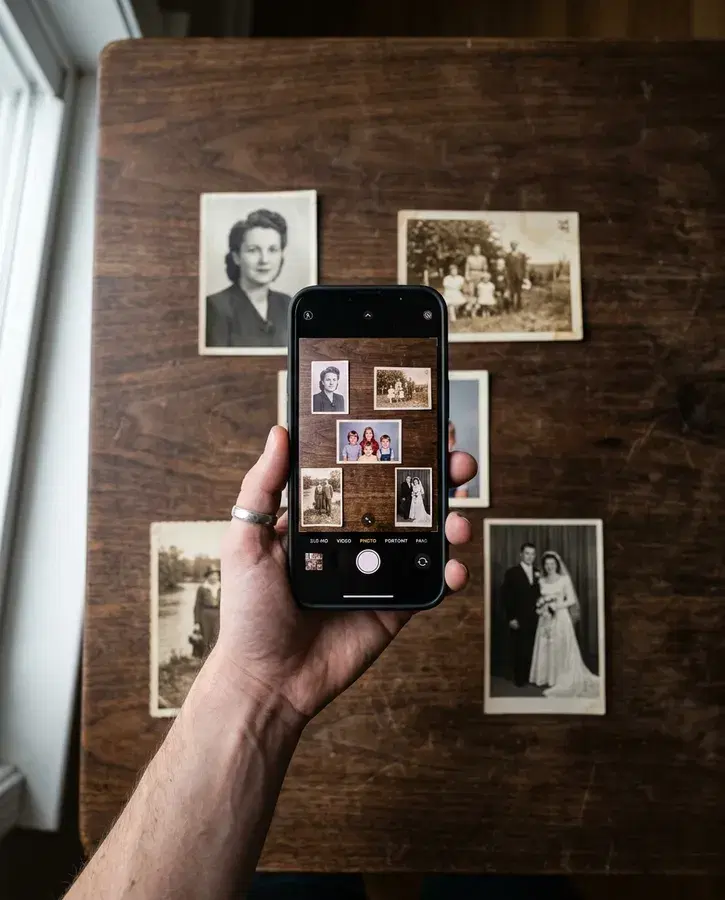
A note on who wrote this: we make one of the options below (Embrance), a way to photograph several prints at once with your phone, and we build funeral slideshows. We have tried to be fair to the other options, including the free ones.
The short answer
Do not mail the prints anywhere this week. Most mail-in services we checked quote weeks, and even the fastest needs the box to travel both ways. Keep the photographs in the house, where you can still reach them if someone remembers one more.
Do it tonight with a phone at a window. On a screen at a service, a careful phone copy of a print is hard to tell from a scan. Two hundred prints is an evening, less if you take several at once.
Or take them to a local shop that scans on the premises. Some camera shops will do it the same day for a small surcharge. Call and ask whether the work is done in the store, because many photo counters send prints away and quote weeks.
What works, by how many days you have
Prices are each company's published figures, checked on 25 September 2026. Where a company charges per photo, the 200 print total is our arithmetic.
| Option | 200 prints | How long | Makes a service this week? |
|---|---|---|---|
| Your phone, one print at a time (Google PhotoScan) | Free | About 8 seconds a print, so roughly half an hour of steady work | Yes, tonight |
| Your phone, several prints at once (Embrance) | Included with a slideshow, or $29 for the photos alone | Four to six prints a shot, so 200 prints is about 35 to 50 shots | Yes, tonight |
| Public library memory lab | Free | You scan them yourself in a booked slot | Yes, if there is a slot |
| Local camera shop (example: Art's Cameras Plus) | $50 for up to 250 quick scans | Typically 3 business days; same day for 10% more | Yes, if it scans in the store |
| ScanMyPhotos express | $97.95 on top of the box price, plus shipping | One business day once it arrives, plus shipping both ways | Only if shipping is fast both ways, and even then it is tight |
| Legacybox bulk, rush | $19.99 plus $29.99 for rush | 1 week on the product page; 10 business days, before shipping, on the help page | No |
| CVS photo transfer | $99.30 | 2 to 3 weeks, shipping included | No |
| Walmart photo transfer | $90.21 | 3 to 4 weeks, shipping included | No |
The mail-in services are good at what they do, and for a box with no deadline they are often the cheapest way through it. We compare them properly in Legacybox or scan at home. They are simply not built for this week.
Tonight, step by step
1. Choose before you copy. You do not need all 200 on the screen. Between 40 and 80 photographs suits most services, so sort the box into rough piles by decade or by chapter of their life, and pull the ones that belong on the screen first. Copy those tonight. The rest can wait until after the funeral, when nobody is in a hurry.
2. Set up once, at a window. Daylight from the side, ceiling light off, the prints on something plain and dark like a tablecloth or a sweater. This is the part that decides how good the copies look, and it takes about ten minutes.
3. Hold the phone flat above the prints. Straight down, not at an angle, so the corners stay square. If you see a bright patch on a glossy print, move until it slides off the photograph.
4. Take several at a time if your tool allows it. Laying out four to six prints a little apart and taking one photo is much faster than one print at a time. With Embrance, digitize your prints and each print comes back as its own cropped, straightened photograph, and you check every one before it is kept.
5. Check the first few on a bigger screen. Before you do 200, look at three of them on a laptop or TV. If they are soft, dark or shiny, fix the light now rather than redoing the box.
For the detail on light, angle and glare, our guide to photographing old prints with your phone goes further.
Albums and frames
Photograph the page as it is first. Before you try to take anything out of an old album, copy the whole page. If a print tears, you still have it.
The old self-adhesive albums hold prints tightly after decades. A certified photo organizer's advice is to work waxed dental floss under a corner with a side-to-side sawing motion, never to use anything sharp like a razor blade, and not to push or pull hard. Some people use a hair dryer on a low setting to loosen stubborn pages, held well back so the print does not melt. If a print will not come free, leave it and use the photo of the page.
Framed prints often come out best with the glass taken off. If you cannot open the frame, turn off the lights behind you and photograph it at a slight angle so your reflection is not in it, then straighten it afterwards.
If this is not the week to do it yourself
You still need someone to copy the prints, because they are in your house and no service can reach them this week. Everything after that can be handed off.
With Embrance's done-for-you service, you send the photos from your phone, relatives can add theirs from their own phones, and we build the slideshow. It is $349. If the invoice is paid and the photos are in at least three days before the service, the finished film is ready the day before, or your money back. Closer than three days, we still work to your date, but that promise does not cover it. Our print scanner comes with it, so photographing a box of prints is the one job left on your side.
If you would rather build it yourself tonight, the same photos go straight into the editor.
Frequently Asked Questions
How long does it take to scan 200 photos?
With a phone app that takes one print at a time, about half an hour of steady work, at roughly eight seconds a print. Taking four to six prints in each photo is faster again. A feeder scanner such as the Epson FastFoto is rated at up to one photo a second. Mail-in services quote two to seven weeks.
Can I get photos scanned the same day?
Yes, at some local camera shops, which scan in the store and charge a small surcharge for same-day work. Call first and ask whether the work is done on the premises, because many photo counters send prints to an outside lab and quote weeks. A library memory lab, if one near you has a free slot, lets you scan them yourself that day for nothing.
Is Legacybox fast enough for a funeral this week?
No. Its fastest published option is a week on its product page and ten business days on its help page, and the help page says shipping is not included. For a service this week, copy the prints at home or at a local shop that scans in the store.
How many photos should I scan for a funeral slideshow?
Between 40 and 80 photographs suits most services, which runs about 3 to 8 minutes on screen. Copy those first. The rest of the box can be digitized after the funeral.
Is a phone good enough, or do the photos need to be scanned?
For a slideshow, a phone is good enough. Once a picture is on a screen at a service, a careful phone copy is hard to tell from a scan, and the light and the angle matter far more than the device. Scan when you want to print a small photo large or frame it.
What if the photos are stuck in an old album?
Photograph the whole page first, so nothing is lost if a print tears. Then, if you want the prints out, work waxed dental floss under a corner with a gentle sawing motion, and never use a blade. If a print will not come free, use the photo of the page.
Sources, checked 25 September 2026: Legacybox bulk photo scanning and Legacybox turnaround help page; ScanMyPhotos prepaid box; Walmart photo transfer; CVS photo transfer; Art's Cameras Plus photo scanning; Mid-Continent Public Library memory lab; EverPresent's PhotoScan review for the timing; Epson FastFoto FF-680W; Andi Willis, Magnetic photo albums, Good Life Photo Solutions. Prices are the companies' published figures on that date and can change.